
No products in the cart.







API Documentation
Reference for available endpoints, request formats, parameters, and example responses for integrating the API into your applications.
This documentation is intended for developers who want to integrate CapSkip directly into their own scripts, applications, or automation systems. Users of third party software should follow the Tutorials section for setup instructions.
CapSkip emulates the APIs of widely used CAPTCHA solving services, allowing it to connect to compatible third party software without requiring any modifications. Integration typically only requires running CapSkip.
The documentation explains how to submit requests and retrieve results. CapSkip supports multiple API families, including the 2Captcha style API (in.php / res.php), the JSON createTask / getTaskResult API used by AntiCaptcha, CapMonster, CapSolver and NextCaptcha, and the DeathByCaptcha REST API. Services within the same family share the same endpoints, request and response format. Only the base URL (host and port) differs for each service.
| API family | Services |
|---|---|
| 2captcha-style | 2captcha.com, rucaptcha.com, solvecaptcha.com, captchas.io |
| JSON (createTask / getTaskResult) | anti-captcha.com, capmonster.cloud, capsolver.com, nextcaptcha.com |
| DeathByCaptcha | deathbycaptcha.com |
 Image CAPTCHA

A normal CAPTCHA is an image containing distorted but human-readable text. To solve it, the user must type the text shown in the image.
To solve a normal CAPTCHA, submit the image via an HTTP POST request to the API endpoint. Send the request directly to your CapSkip instance using the configured local address and port, for example: http://127.0.0.1:PORT/in.php
CapSkip accepts images in multipart/form-data or Base64-encoded format.
Multipart sample form
<form method="post" action="http://127.0.0.1:PORT/in.php" enctype="multipart/form-data">
<input type="hidden" name="method" value="post">
Your key:
<input type="text" name="key" value="YOUR_APIKEY">
The CAPTCHA file:
<input type="file" name="file">
<input type="submit" value="Upload and get the ID">
</form>
YOUR_APIKEY represents your API key if API key validation is enabled in CapSkip. If API key validation is disabled, any string value will be accepted.
Base64 sample form
<form method="post" action="http://127.0.0.1:PORT/in.php">
<input type="hidden" name="method" value="base64">
Your key:
<input type="text" name="key" value="YOUR_APIKEY">
The CAPTCHA file body in base64 format:
<textarea name="body">BASE64_FILE</textarea>
<input type="submit" value="Upload and get the ID">
</form>
YOUR_APIKEY represents your API key if API key validation is enabled in CapSkip. If API key validation is disabled, any string value will be accepted.
BASE64_FILE is the Base64-encoded image data.
List of POST Request Parameters
| POST parameter | Type | Required | Description |
|---|---|---|---|
| key | String | Yes | Your CapSkip API key. |
| method | String | Yes |
post: submit the image using multipart/form-data base64: submit the image as a Base64-encoded string |
| file | File | Yes* |
CAPTCHA image file. * Required when method=post. |
| body | String | Yes* |
Base64-encoded CAPTCHA image data. * Required when method=base64. |
| json | Integer Default: 0 | No |
0: response is returned as plain text 1: response is returned in JSON format |
Submit CAPTCHA (multipart file upload):
curl -X POST -F "key=YOUR_API_KEY" -F "method=post" -F "[email protected]" http://127.0.0.1:8080/in.php
Submit CAPTCHA (base64 encoded):
curl -X POST -d "key=YOUR_API_KEY&method=base64&body=BASE64_IMAGE_DATA" http://127.0.0.1:8080/in.php
After submitting the request, if everything is correct, CapSkip will return the CAPTCHA ID as plain text: OK|12345
If the json=1 parameter is used, the response will be returned in JSON format:
{
"status":1,
"request":"12345"
}
Wait 1 second, then send an HTTP GET request to the result endpoint (/res.php) with the returned CAPTCHA ID.
If the CAPTCHA has been solved, CapSkip will return the result as plain text: OK|TEXT
If json=1 was specified, the response will be:
{
"status":1,
"request":"TEXT"
}
If the CAPTCHA is not yet solved, CapSkip will return: CAPCHA_NOT_READY
In this case, wait 1 second and repeat the request until a final result is received. If CapSkip returns an empty response body, the result has already been retrieved or the ID does not exist. Each result can be read only once.
List of GET request parameters
| GET parameter | Type | Required | Description |
|---|---|---|---|
| key | String | Yes | Your CapSkip API key. |
| action | String | Yes | get: retrieve the answer for the submitted CAPTCHA. |
| id | Integer | Yes |
The CAPTCHA ID returned by in.php. |
| json | Integer Default: 0 | No |
0: response is returned as plain text 1: response is returned in JSON format |
curl "http://127.0.0.1:8080/res.php?key=YOUR_API_KEY&action=get&id=CAPTCHA_ID"
reCAPTCHA V2
 reCAPTCHA V2
reCAPTCHA v2, also known as the “I’m not a robot” reCAPTCHA, is a widely used CAPTCHA type. The visitor ticks a checkbox, and Google either lets them through at once or asks them to pick matching images before the form can be submitted.
To solve reCAPTCHA v2, send the googlekey and pageurl parameters along with method=userrecaptcha and your CapSkip API key.
You can obtain the googlekey using one of the following methods:
Right-click on the reCAPTCHA widget and select Inspect. Locate a URL that begins with:
www.google.com/recaptcha/api2/anchor
Copy the value of the k parameter from that URL. Alternatively, find the data-sitekey attribute in the page source and copy its value.
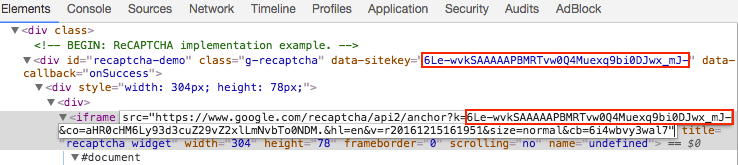
Once you have the site key, submit an HTTP GET or POST request to http://127.0.0.1:PORT/in.php
List of POST Request Parameters
| Parameter | Type | Required | Description |
|---|---|---|---|
| key | String | Yes | Your CapSkip API key. |
| method | String | Yes | userrecaptcha: specifies a reCAPTCHA v2 request. |
| googlekey | String | Yes | The value of the k or data-sitekey parameter found on the target page. |
| pageurl | String | Yes | The full URL of the page where the reCAPTCHA is located. |
| enterprise | Integer Default: 0 | No |
1: indicates reCAPTCHA Enterprise v2. 0: standard reCAPTCHA v2. |
| invisible | Integer Default: 0 | No |
1: indicates Invisible reCAPTCHA. 0: standard checkbox reCAPTCHA. |
| data-s | String | No | Value of the data-s parameter found on the page. Applicable to Google Search and certain Google services. |
| json | Integer Default: 0 | No |
0: response is returned as plain text. 1: response is returned in JSON format. |
| proxy | String | No | Proxy address. Format for IP authentication: IP:PORT (example: 123.123.123.123:3128). Format for login/password authentication: login:password@IP:PORT |
| proxytype | String | No | Type of proxy. Supported values: HTTP, HTTPS, SOCKS5, SOCKS5H. Default: HTTP when proxy is provided but proxytype is omitted. |
Submit reCAPTCHA v2 (Standard):
curl -X POST -d "key=YOUR_API_KEY&method=userrecaptcha&googlekey=6Le-wvkSAAAAAPBMRTvw0Q4Muexq9bi0DJwx_mJ-&pageurl=https://example.com" http://127.0.0.1:8080/in.php
Submit reCAPTCHA v2 (Invisible):
curl -X POST -d "key=YOUR_API_KEY&method=userrecaptcha&googlekey=6Le-wvkSAAAAAPBMRTvw0Q4Muexq9bi0DJwx_mJ-&pageurl=https://example.com&invisible=1" http://127.0.0.1:8080/in.php
Submit Enterprise reCAPTCHA v2:
curl -X POST -d "key=YOUR_API_KEY&method=userrecaptcha&googlekey=6Le-wvkSAAAAAPBMRTvw0Q4Muexq9bi0DJwx_mJ-&pageurl=https://example.com&enterprise=1" http://127.0.0.1:8080/in.php
Submit Enterprise reCAPTCHA v2 (Invisible):
curl -X POST -d "key=YOUR_API_KEY&method=userrecaptcha&googlekey=6Le-wvkSAAAAAPBMRTvw0Q4Muexq9bi0DJwx_mJ-&pageurl=https://example.com&enterprise=1&invisible=1" http://127.0.0.1:8080/in.php
If the request is successful, CapSkip will return the CAPTCHA ID as plain text: OK|12345
If the json=1 parameter was used, the response will be returned in JSON format:
{
"status":1,
"request":"12345"
}
If the request fails, CapSkip will return an error code.
Wait 15 to 20 seconds, then send an HTTP GET request to the result endpoint to retrieve the solution: http://127.0.0.1:PORT/res.php
List of GET request parameters
| GET parameter | Type | Required | Description |
|---|---|---|---|
| key | String | Yes | Your CapSkip API key. |
| action | String | Yes | get: retrieve the answer for the submitted CAPTCHA. |
| id | Integer | Yes |
The CAPTCHA ID returned by in.php. |
| json | Integer Default: 0 | No |
0 returns the response as plain text. 1 returns the response as JSON, including the userAgent value when one is available. |
curl "http://127.0.0.1:8080/res.php?key=YOUR_API_KEY&action=get&id=CAPTCHA_ID"
If the CAPTCHA has been solved, CapSkip will respond in plain text or JSON and return the answer token. The token will look similar to the following:
03AHJ_Vuve5Asa4koK3KSMyUkCq0vUFCR5Im4CwB7PzO3dCxIo11i53epEraq-uBO5mVm2XRikL8iKOWr0aG50sCuej9bXx5qcviUGSm4iK4NC_Q88flavWhaTXSh0VxoihBwBjXxwXuJZ-WGN5Sy4dtUl2wbpMqAj8Zwup1vyCaQJWFvRjYGWJ_TQBKTXNB5CCOgncqLetmJ6B6Cos7qoQyaB8ZzBOTGf5KSP6e-K9niYs772f53Oof6aJeSUDNjiKG9gN3FTrdwKwdnAwEYX-F37sI_vLB1Zs8NQo0PObHYy0b0sf7WSLkzzcIgW9GR0FwcCCm1P8lB-50GQHPEBJUHNnhJyDzwRoRAkVzrf7UkV8wKCdTwrrWqiYDgbrzURfHc2ESsp020MicJTasSiXmNRgryt-gf50q5BMkiRH7osm4DoUgsjc_XyQiEmQmxl5sqZP7aKsaE-EM00x59XsPzD3m3YI6SRCFRUevSyumBd7KmXE8VuzIO9lgnnbka4-eZynZa6vbB9cO3QjLH0xSG3-egcplD1uLGh79wC34RF49Ui3eHwua4S9XHpH6YBe7gXzz6_mv-o-fxrOuphwfrtwvvi2FGfpTexWvxhqWICMFTTjFBCEGEgj7_IFWEKirXW2RTZCVF0Gid7EtIsoEeZkPbrcUISGmgtiJkJ_KojuKwImF0G0CsTlxYTOU2sPsd5o1JDt65wGniQR2IZufnPbbK76Yh_KI2DY4cUxMfcb2fAXcFMc9dcpHg6f9wBXhUtFYTu6pi5LhhGuhpkiGcv6vWYNxMrpWJW_pV7q8mPilwkAP-zw5MJxkgijl2wDMpM-UUQ_k37FVtf-ndbQAIPG7S469doZMmb5IZYgvcB4ojqCW3Vz6Q
Each token comes with the browser User-Agent it was obtained with. With json=1 the response includes a userAgent field next to request. In plain text mode, read the same value from the X-Recaptcha-User-Agent response header. If you use the JSON API, getTaskResult returns it as solution.userAgent. Send this User-Agent when you submit the token, because some sites check that the two match. The field and the header are left out when no User-Agent is available.
{
"status": 1,
"request": "03AHJ_Vuve5Asa4koK3KSMyUkCq0vUFCR5Im4CwB7PzO3dCxIo11i53epEraq...",
"userAgent": "Mozilla/5.0 (Windows NT 10.0; Win64; x64) AppleWebKit/537.36 (KHTML, like Gecko) Chrome/140.0.0.0 Safari/537.36"
}
If the CAPTCHA is not yet solved, CapSkip will return CAPCHA_NOT_READY. In this case, wait 5 seconds and repeat the request. If CapSkip returns an empty response body, the result has already been retrieved or the ID does not exist. Each result can be read only once.
Locate the element with the ID g-recaptcha-response and make it visible by removing the display: none style.

Please note: In some cases, the page content is generated dynamically, and the
g-recaptcha-responseelement may not appear in the static HTML source. In such situations, inspect the page structure using your browser’s developer tools to locate the dynamically generated element.
As an alternative, you can use JavaScript to set the value of the g-recaptcha-response field directly:
document.getElementById("g-recaptcha-response").innerHTML="TOKEN";An input field will appear on the page. Paste the answer token into that field and submit the form.
reCAPTCHA V2 Callback
In some cases, there is no submit button and a callback function is used instead. The callback function is executed automatically when reCAPTCHA is solved.
The list of POST and GET request parameters is available here: reCAPTCHA V2 POST and GET request parameters
The callback function is typically defined in the data-callback attribute of the reCAPTCHA widget, for example:
data-callback="myCallbackFunction"
In other cases, the callback function is defined as the callback parameter of the grecaptcha.render() function, for example:
grecaptcha.render('example', {
'sitekey' : 'someSitekey',
'callback' : myCallbackFunction,
'theme' : 'dark'
});
Another way to locate the callback function is to open the browser’s JavaScript console and inspect the reCAPTCHA configuration object:
___grecaptcha_cfg.clients[0].aa.l.callback
Note that the aa.l property may vary, and there may be multiple reCAPTCHA clients on the page. In such cases, you should also inspect clients[1], clients[2], and other entries to locate the correct configuration object.
Alternatively, you can use the following script to automatically extract reCAPTCHA parameters:
function findRecaptchaClients() {
if (typeof (___grecaptcha_cfg) !== 'undefined') {
return Object.entries(___grecaptcha_cfg.clients).map(([cid, client]) => {
const data = { id: cid, version: cid >= 10000 ? 'V3' : 'V2' };
const objects = Object.entries(client).filter(([_, value]) => value && typeof value === 'object');objects.forEach(([toplevelKey, toplevel]) => {
const found = Object.entries(toplevel).find(([_, value]) => (
value && typeof value === 'object' && 'sitekey' in value && 'size' in value
));
if (typeof toplevel === 'object' && toplevel instanceof HTMLElement && toplevel['tagName'] === 'DIV'){
data.pageurl = toplevel.baseURI;
}
if (found) {
const [sublevelKey, sublevel] = found;data.sitekey = sublevel.sitekey;
const callbackKey = data.version === 'V2' ? 'callback' : 'promise-callback';
const callback = sublevel[callbackKey];
if (!callback) {
data.callback = null;
data.function = null;
} else {
data.function = callback;
const keys = [cid, toplevelKey, sublevelKey, callbackKey].map((key) => `['${key}']`).join('');
data.callback = `___grecaptcha_cfg.clients${keys}`;
}
}
});
return data;
});
}
return [];
}
Finally, call the callback function:
myCallbackFunction();
Or alternatively:
___grecaptcha_cfg.clients[0].aa.l.callback();
In some cases, the callback function requires an argument. In most situations, you should pass the solved token as that argument. For example:
myCallbackFunction('TOKEN'); reCAPTCHA V2 Invisible
reCAPTCHA v2 also has an Invisible mode. You can see an example here:
https://www.google.com/recaptcha/api2/demo?invisible=true
Invisible reCAPTCHA does not display the “I’m not a robot” checkbox. Instead, it is typically attached to a button or triggered automatically on page load or user interaction, such as clicking a button or submitting a form.
Internally, the Invisible reCAPTCHA widget is rendered inside a hidden <div> element positioned outside the visible viewport, making it invisible to the user.
Depending on the user’s cookies and risk score, reCAPTCHA may pass automatically without displaying a challenge. Otherwise, a standard image challenge will appear.
In most cases, once the challenge is completed, a callback function is executed. Refer to the callback section above for more details.
The list of POST and GET request parameters is available here: reCAPTCHA V2 POST and GET request parameters
How to Determine if reCAPTCHA is Invisible?
You can identify Invisible reCAPTCHA using one of the following indicators:
The “I’m not a robot” checkbox is not visible, but a challenge appears after user interaction.
The reCAPTCHA iframe URL contains the parameter
size=invisible.The reCAPTCHA configuration object includes a
sizeproperty set toinvisible, for example:___grecaptcha_cfg.clients[0].aa.l.size === "invisible"
When solving Invisible reCAPTCHA via API, include the parameter: invisible=1
How to Handle Invisible reCAPTCHA in the Browser?
Method 1: Using JavaScript
Set the value of the g-recaptcha-response field to the token returned by CapSkip:
document.getElementById("g-recaptcha-response").innerHTML="TOKEN";After setting the token, execute the action that normally occurs after successful verification.
In most cases, this means submitting a form. You need to identify the correct form by its id, name, or another attribute, and then trigger the submission. Here are a few examples:
document.getElementById("recaptcha-demo-form").submit(); //by id "recaptcha-demo-form"
document.getElementsByName("myFormName")[0].submit(); //by element name "myFormName"
document.getElementsByClassName("example").submit(); //by class name "example"
In some cases, a callback function is executed automatically when reCAPTCHA is solved.
The callback function is typically defined in the data-callback attribute of the reCAPTCHA widget, for example:
data-callback="myCallbackFunction"
In other cases, the callback function is defined as the callback parameter of the grecaptcha.render() function, for example:
grecaptcha.render('example', {
'sitekey' : 'someSitekey',
'callback' : myCallbackFunction,
'theme' : 'dark'
});
All you need to do is call that function:
myCallbackFunction();
Method 2: Modifying the HTML
Remove the <div> element that contains the reCAPTCHA widget from the page body.
<div style="visibility: hidden; position: absolute; width:100%; top: -10000px; left: 0px; right: 0px; transition: visibility 0s linear 0.3s, opacity 0.3s linear; opacity: 0;">
<div style="width: 100%; height: 100%; position: fixed; top: 0px; left: 0px; z-index: 2000000000; background-color: #fff; opacity: 0.5;  filter: alpha(opacity=50)"></div>
<div style="margin: 0 auto; top: 0px; left: 0px; right: 0px; position: absolute; border: 1px solid #ccc; z-index: 2000000000; background-color: #fff; overflow: hidden;">
<iframe src="https://www.google.com/recaptcha/api2/bframe?hl=en&v=r20170213115309&k=6LfP0CITAAAAAHq9FOgCo7v_fb0-pmmH9VW3ziFs#zglq3yifgkmj"
title="recaptcha challenge"
style="width: 100%; height: 100%;"
scrolling="no"
name="zglq3yifgkmj"
frameborder="0"></iframe>
</div>
</div>
Remove the entire reCAPTCHA block from the page.
<div class="">
<!-- BEGIN: ReCAPTCHA implementation example. -->
<div
id="recaptcha-demo"
class="g-recaptcha"
data-sitekey="6LfP0CITAAAAAHq9FOgCo7v_fb0-pmmH9VW3ziFs"
data-callback="onSuccess"
data-bind="recaptcha-demo-submit"
>
<div
class="grecaptcha-badge"
style="width: 256px; height: 60px; transition: right 0.3s ease 0s; position: fixed; bottom: 14px; right: -186px; box-shadow: 0px 0px 5px gray;"
>
<div class="grecaptcha-logo">
<iframe
src="https://www.google.com/recaptcha/api2/anchor?k=6LfP0CITAAAAAHq9FOgCo7v_fb0-pmmH9VW3ziFs&co=aHR0cHM6Ly93d3cuZ29vZ2xlLmNvbTo0NDM.&hl=en&v=r20170213115309&size=invisible&cb=uror1hlow5a"
title="recaptcha widget"
scrolling="no"
name="undefined"
width="256"
height="60"
frameborder="0"
></iframe>
</div>
<div class="grecaptcha-error"></div>
<textarea
id="g-recaptcha-response"
name="g-recaptcha-response"
class="g-recaptcha-response"
style="width: 250px; height: 40px; border: 1px solid #c1c1c1; margin: 10px 25px; padding: 0px; resize: none;  display: none; "
></textarea>
</div>
</div>
<script>
var onSuccess = function (response) {
var errorDivs = document.getElementsByClassName('recaptcha-error');
if (errorDivs.length) {
errorDivs[0].className = '';
}
var errorMsgs = document.getElementsByClassName('recaptcha-error-message');
if (errorMsgs.length) {
errorMsgs[0].parentNode.removeChild(errorMsgs[0]);
}
document.getElementById('recaptcha-demo-form').submit();
};
</script>
<!-- Optional noscript fallback. --><!-- END: ReCAPTCHA implementation example. -->
</div>
Insert the following code in place of the removed block:
<input type="submit" /> <textarea name="g-recaptcha-response">%g-recaptcha-response%</textarea>
%g-recaptcha-response% represents the answer token received from CapSkip.
After replacing the block, a “Submit query” button will appear. Click the button to submit the form along with the g-recaptcha-response value and all other required form data to the website.
reCAPTCHA V3
reCAPTCHA v3 is a modern CAPTCHA mechanism developed by Google. It does not present a visible challenge and requires no user interaction. Instead, it assigns a score based on the likelihood that the interaction is human.
Technically, reCAPTCHA v3 is similar to reCAPTCHA v2. The website receives a token from the reCAPTCHA API, which is then sent in a POST request to the target server and verified through the reCAPTCHA API.
The key difference is that reCAPTCHA v3 does not display a visible challenge. Instead, it returns a rating that estimates whether the user is human or a bot. This rating is called a score and ranges from 0.0 to 1.0. The score is sent to the website, which then decides how to handle the request based on that value.
There is also an additional parameter called action, which allows the website to distinguish between different user interactions. After verifying the token, the reCAPTCHA API returns the action name associated with the request.
How to Solve reCAPTCHA v3 Using CapSkip?
First, confirm that the target website is using reCAPTCHA v3.
Indicators of reCAPTCHA v3 include:
No visible CAPTCHA or image challenges
The
api.jsscript is loaded with arender=SITEKEYparameter, for example:https://www.google.com/recaptcha/api.js?render=SITEKEYThe
___grecaptcha_cfg.clientsarray contains an entry with a high numeric index, such asclients[100000]
To solve reCAPTCHA v3, identify the following parameters:
- sitekey
This can be found in therenderparameter of theapi.jsscript URL. It may also appear in an iframe URL, within JavaScript code that callsgrecaptcha.execute(), or inside the___grecaptcha_cfgconfiguration object. - action
Locate this by inspecting JavaScript code for calls togrecaptcha.execute(), for example:grecaptcha.execute('SITEKEY', {action: 'do_something'})In some cases, finding the action requires reviewing multiple JavaScript files loaded by the page. If you cannot determine the action value, you may use the default value"verify". - pageurl
The full URL of the page where reCAPTCHA v3 is implemented.
Understanding the Score
The acceptable score threshold varies by website and can only be determined through testing. Scores range from:
0.0 → likely bot
1.0 → likely human
Most websites use thresholds between 0.3 and 0.7, since even legitimate users may receive lower scores.
You can pass your desired threshold using the min_score parameter, but the final score is always decided by Google at verification time and cannot be guaranteed by the solver.
List of POST Request Parameters
| Parameter | Type | Required | Description |
|---|---|---|---|
| key | String | Yes | Your CapSkip API key. |
| method | String | Yes | userrecaptcha: specifies a reCAPTCHA request. |
| version | String | Yes | v3: indicates that the request is for reCAPTCHA v3. |
| googlekey | String | Yes | The value of the data-sitekey parameter found on the target page. |
| pageurl | String | Yes | The full URL of the page where the reCAPTCHA is located. |
| enterprise | Integer Default: 0 | No |
1: indicates reCAPTCHA Enterprise v3. 0: standard reCAPTCHA v3. |
| action | String Default: verify | No | The value of the action parameter defined on the page. |
| min_score | Float | No | Requested minimum score for the token. Google assigns the final score when your server verifies the token, so this value is a hint and is not guaranteed. CapSkip returns the token it obtains regardless of the score Google later assigns. |
| json | Integer Default: 0 | No |
0: response is returned as plain text. 1: response is returned in JSON format. |
| proxy | String | No | Proxy address. Format for IP authentication: IP:PORT (example: 123.123.123.123:3128). Format for login/password authentication: login:password@IP:PORT |
| proxytype | String | No | Type of proxy. Supported values: HTTP, HTTPS, SOCKS5, SOCKS5H. Default: HTTP when proxy is provided but proxytype is omitted. |
Submit reCAPTCHA v3:
curl -X POST -d "key=YOUR_API_KEY&method=userrecaptcha&version=v3&action=submit&min_score=0.7&googlekey=6Le-wvkSAAAAAPBMRTvw0Q4Muexq9bi0DJwx_mJ-&pageurl=https://example.com" http://127.0.0.1:8080/in.php
Submit Enterprise reCAPTCHA v3:
curl -X POST -d "key=YOUR_API_KEY&method=userrecaptcha&version=v3&action=submit&min_score=0.7&googlekey=6Le-wvkSAAAAAPBMRTvw0Q4Muexq9bi0DJwx_mJ-&pageurl=https://example.com&enterprise=1" http://127.0.0.1:8080/in.php
If the request is successful, CapSkip will return the CAPTCHA ID as plain text: OK|12345
If the json=1 parameter is specified, the response will be returned in JSON format:
{
"status":1,
"request":"12345"
}
If an error occurs, CapSkip will return an error code.
Wait 10 to 15 seconds, then send an HTTP GET request to the result endpoint: http://127.0.0.1:PORT/res.php
Provide the returned CAPTCHA ID in your request. The full list of available parameters is shown in the table below.
If the CAPTCHA has been solved successfully, CapSkip will return the result in plain text or JSON format. The returned value is a verification token similar to the following:
03AHJ_Vuve5Asa4koK3KSMyUkCq0vUFCR5Im4CwB7PzO3dCxIo11i53epEraq-uBO5mVm2XRikL8iKOWr0aG50sCuej9bXx5qcviUGSm4iK4NC_Q88flavWhaTXSh0VxoihBwBjXxwXuJZ-WGN5Sy4dtUl2wbpMqAj8Zwup1vyCaQJWFvRjYGWJ_TQBKTXNB5CCOgncqLetmJ6B6Cos7qoQyaB8ZzBOTGf5KSP6e-K9niYs772f53Oof6aJeSUDNjiKG9gN3FTrdwKwdnAwEYX-F37sI_vLB1Zs8NQo0PObHYy0b0sf7WSLkzzcIgW9GR0FwcCCm1P8lB--gf50q5BMkiRH7osm4DoUgsjc_XyQiEmQmxl5sqZP7aKsaE-EM00x59XsPzD3m3YI6SRCFRUevSyumBd7KmXE8VuzIO9lgnnbka4-eZynZa6vbB9cO3QjLH0xSG3--o-fxrOuphwfrtwvvi2FGfpTexWvxhqWICMFTTjFBCEGEgj7_IFWEKirXW2RTZCVF0Gid7EtIsoEeZkPbrcUISGmgtiJkJ_KojuKwImF0G0CsTlxYTOU2sPsd5o1JDt65wGniQR2IZufnPbbK76Yh_KI2DY4cUxMfcb2fAXcFMc9dcpHg6f9wBXhUtFYTu6pi5LhhGuhpkiGcv6vWYNxMrpWJW_pV7q8mPilwkAP-zw5MJxkgijl2wDMpM-UUQ_k37FVtf-ndbQAIPG7S469doZMmb5IZYgvcB4ojqCW3Vz6Q
Each token comes with the browser User-Agent it was obtained with. With json=1 the response includes a userAgent field next to request. In plain text mode, read the same value from the X-Recaptcha-User-Agent response header. If you use the JSON API, getTaskResult returns it as solution.userAgent. Send this User-Agent when you submit the token, because some sites check that the two match. The field and the header are left out when no User-Agent is available.
{
"status": 1,
"request": "03AHJ_Vuve5Asa4koK3KSMyUkCq0vUFCR5Im4CwB7PzO3dCxIo11i53epEraq...",
"userAgent": "Mozilla/5.0 (Windows NT 10.0; Win64; x64) AppleWebKit/537.36 (KHTML, like Gecko) Chrome/140.0.0.0 Safari/537.36"
}
If the CAPTCHA is not yet solved, CapSkip will return CAPCHA_NOT_READY. Wait 5 seconds and repeat the request. If CapSkip returns an empty response body, the result has already been retrieved or the ID does not exist. Each result can be read only once.
List of GET request parameters
| GET parameter | Type | Required | Description |
|---|---|---|---|
| key | String | Yes | Your CapSkip API key. |
| action | String | Yes | get: retrieve the answer for the submitted CAPTCHA. |
| id | Integer | Yes |
The CAPTCHA ID returned by in.php. |
| json | Integer Default: 0 | No |
0 returns the response as plain text. 1 returns the response as JSON, including the userAgent value when one is available. |
curl "http://127.0.0.1:8080/res.php?key=YOUR_API_KEY&action=get&id=CAPTCHA_ID"
After receiving the token from CapSkip, you must submit it correctly to the target website. The best way to understand how this works is to observe the requests sent when completing the verification as a normal user. Most browsers provide developer tools with a Network tab that allows you to inspect outgoing requests.
In most cases, the token is sent via a POST request. The parameter name may be g-recaptcha-response, similar to reCAPTCHA v2, or something like g-recaptcha-response-100000. In some implementations, a different parameter name may be used.
You should inspect the network requests to determine how the token is transmitted and then structure your request accordingly.
reCAPTCHA Enterprise
reCAPTCHA Enterprise is the advanced version of Google’s reCAPTCHA system. It can operate in both v2 and v3 modes and provides website administrators with additional control, including the ability to assess and report whether an interaction was human or automated.
How to Solve reCAPTCHA Enterprise?
The first step is to determine whether the website is using the Enterprise version of reCAPTCHA.
Key indicators of reCAPTCHA Enterprise include:
The page loads
enterprise.jsinstead ofapi.js, for example:<script src="https://recaptcha.net/recaptcha/enterprise.js" async defer></script>
The website’s JavaScript code calls
grecaptcha.enterprise.METHODinstead ofgrecaptcha.METHOD
Next, determine which implementation is being used: v2, Invisible v2, or v3. This can usually be identified by analyzing how the widget is rendered and how it behaves on the page.
Follow the flowchart below to determine the correct implementation. It applies in the vast majority of cases.
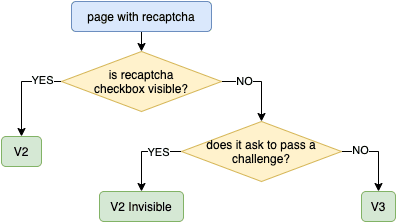
Identify the CAPTCHA parameters in the same way as described for reCAPTCHA v2 or v3.
For v2 Enterprise implementations, there may be additional optional data. In most cases, this is a custom string defined in the s or data-s parameter. If present, include this value in your request using the data-s parameter.
The list of POST and GET request parameters is available here: reCAPTCHA V2 POST and GET request parameters
For v3 Enterprise implementations, you may also need the action value. To find it, inspect the website’s JavaScript code and locate the grecaptcha.enterprise.execute() call. The action parameter is typically passed within this function. Keep in mind that action is optional and may be undefined in some cases.
The list of POST and GET request parameters is available here: reCAPTCHA V3 POST and GET request parameters
When submitting your request to the /in.php endpoint, include the additional parameter: enterprise=1
After that, interact with CapSkip API in the same way as when solving reCAPTCHA v2 or v3. Once the token is returned, submit it to the target website according to its implementation.
 Cloudflare Turnstile
 Cloudflare Turnstile
Cloudflare Turnstile is a modern CAPTCHA alternative developed by Cloudflare. It verifies whether a visitor is human without relying on traditional visual challenges. Turnstile can appear as a standalone widget or as part of a challenge page, and it operates with minimal or no user interaction.
There are two common Turnstile implementations:
1. Standalone Turnstile Widget
A standalone Turnstile widget is embedded directly on a website page, typically protecting a form from automated submissions. In this case:
Extract the
sitekeyfrom the page.Send it to the CapSkip API along with the full
pageurl.After receiving the token, insert it into the
cf-turnstile-responsefield.In some implementations, the token may also need to be placed in the
g-recaptcha-responsefield.If a callback is defined in the
turnstile.render()configuration, execute it with the returned token.
Then submit the form as usual.
2. Turnstile on a Cloudflare Challenge Page
This occurs when the website is proxied through Cloudflare and presents a Turnstile challenge page before granting access. In this case, you must extract the following parameters:
cDatachlPageDataaction
These values must be included in your API request. Additionally, you must use the User-Agent value returned by the CapSkip API when submitting the token.
How to Extract the Required Parameters?
To extract the required parameters, you can override the turnstile.render method and intercept the arguments passed when it is called. For example, inject the following JavaScript code into the page. The script must be executed before the Turnstile widget is loaded in order to capture the parameters successfully.
const i = setInterval(()=>{
if (window.turnstile) {
clearInterval(i)
window.turnstile.render = (a,b) => {
let p = {
method: "turnstile",
key: "YOUR_API_KEY",
sitekey: b.sitekey,
pageurl: window.location.href,
data: b.cData,
pagedata: b.chlPageData,
action: b.action,
userAgent: navigator.userAgent,
json: 1
}
console.log(JSON.stringify(p))
window.tsCallback = b.callback
return 'foo'
}
}
},50)
List of POST Request Parameters
| Parameter | Type | Required | Description |
|---|---|---|---|
| key | String | Yes | Your CapSkip API key. |
| method | String | Yes | turnstile: specifies a Cloudflare Turnstile request. |
| sitekey | String | Yes | The value of the data-sitekey parameter found on the target page. |
| pageurl | String | Yes | The full URL of the page where the Turnstile challenge is located. |
| action | String | No |
Optional action value defined in the data-action attribute or passed to turnstile.render(). |
| data | String | No |
The value of cData passed to turnstile.render() or defined in the data-cdata attribute. |
| pagedata | String | No |
The value of chlPageData passed to turnstile.render(). |
| json | Integer Default: 0 | No |
0: response is returned as plain text. 1: response is returned in JSON format. |
| proxy | String | No | Proxy address. Format for IP authentication: IP:PORT (example: 123.123.123.123:3128). Format for login/password authentication: login:password@IP:PORT |
| proxytype | String | No | Type of proxy. Supported values: HTTP, HTTPS, SOCKS5, SOCKS5H. Default: HTTP when proxy is provided but proxytype is omitted. |
Submit Turnstile (standalone):
curl -X POST -d "key=YOUR_API_KEY&method=turnstile&sitekey=0x4AAAAAAABUYP0XeMJF0xoy&pageurl=https://example.com" http://127.0.0.1:8080/in.php
Submit Turnstile (challenge page, with optional action, data, pagedata):
curl -X POST -d "key=YOUR_API_KEY&method=turnstile&sitekey=0x4AAAAAAABUYP0XeMJF0xoy&pageurl=https://example.com&action=managed&data=...&pagedata=..." http://127.0.0.1:8080/in.php
If the request is successful, CapSkip will return the CAPTCHA ID as plain text: OK|12345
If the json=1 parameter is specified, the response will be returned in JSON format:
{
"status":1,
"request":"12345"
}
If an error occurs, CapSkip will return an error code.
Use the returned ID to retrieve the result from the /res.php endpoint of the API.
List of GET request parameters
| GET parameter | Type | Required | Description |
|---|---|---|---|
| key | String | Yes | Your CapSkip API key. |
| action | String | Yes | get: retrieve the answer for the submitted CAPTCHA. |
| id | Integer | Yes |
The CAPTCHA ID returned by in.php. |
| json | Integer Default: 0 | No |
0 - response is returned as plain text. 1 - response is returned in JSON format, including the userAgent value. |
For Cloudflare Turnstile the solver uses a specific browser User-Agent, and you must send that same User-Agent when submitting the token. With json=1 the response includes a userAgent field. In plain text mode, read the same value from the X-Turnstile-User-Agent response header.
curl "http://127.0.0.1:8080/res.php?key=YOUR_API_KEY&action=get&id=CAPTCHA_ID"
Cloudflare Challenge (cf_clearance)

Some sites behind Cloudflare stop every visitor at a full page that reads “Just a moment...” before showing any content. Passing that page sets a cf_clearance cookie, and every later request that carries the cookie is let straight through. CapSkip passes the page for the URL you send and returns the cookie, so a script or tool that has no browser of its own can fetch the site with ordinary HTTP requests.
How It Works
This method is for the full page challenge. If the site shows a Turnstile widget inside a form instead, you want a token, not a cookie: see the Cloudflare Turnstile section above.
Cloudflare binds a cf_clearance cookie to the IP address and the User-Agent that earned it. A cookie replayed from a different address, or with a different User-Agent, is refused and the challenge page comes back. That is why every request for this method carries your proxy, and why the answer tells you which User-Agent to send.
The full cycle is four steps:
- Turn on Return cf_clearance cookies in CapSkip (see below).
- Submit the page URL and your proxy to
/createTask. - Poll
/getTaskResultuntil the cookie is ready. - Send your own requests through the same proxy, with the same User-Agent and the cookie.
This method is available on the JSON createTask / getTaskResult API only. The legacy in.php / res.php surface has no cookie mode.
Before You Start
The method is off by default. Open CapSkip, go to Settings, Captcha types, Cloudflare, and turn on Return cf_clearance cookies. While it is off, every request for this method is refused with ERROR_TASK_NOT_SUPPORTED. The switch takes effect on the next request; there is nothing to restart.
Two things are required on every request:
- A proxy. The cookie is only valid from the address that earned it, so the request has to name the proxy you will use afterwards. A request without one is refused before any work is done. HTTP, HTTPS, SOCKS5 and SOCKS5H proxies are accepted; SOCKS4 is not.
- A matching User-Agent, if you send one. It must be the User-Agent of Chrome for Windows, with the same major version as the Google Chrome installed on the computer running CapSkip. Any other User-Agent would produce a cookie the site rejects, so it is refused up front with an error instead. The simplest choice is to send no User-Agent at all and use the one returned with the cookie.
Task Types
Three spellings of the same request are accepted, one for each client family that has a cookie mode. They all solve the same way; only the field names and the shape of the answer differ.
| Task type | Style | Supported | Description |
|---|---|---|---|
AntiCloudflareTask | CapSolver | Yes | Proxy as a single proxy string. The answer carries the cookie, a token holding the same value, and the User-Agent. |
TurnstileTask with cloudflareTaskType set to cf_clearance | CapMonster | Yes | Proxy as separate fields. The answer carries the cookie, plus the User-Agent when the request did not send one. |
TurnstileTask without websiteKey | NextCaptcha | Yes | Proxy as separate fields. Recognised only while NextCaptcha is the selected service. The answer carries the cookie and the User-Agent. |
AntiCloudflareTask Parameters
| Parameter | Type | Required | Description |
|---|---|---|---|
| clientKey | String | Yes* | Your CapSkip API key. Required only when API Key Validation is enabled. |
| type | String | Yes | Must be AntiCloudflareTask. |
| websiteURL | String | Yes | The full http or https URL of the page that shows the challenge. |
| proxy | String | Yes | The proxy to solve through. Accepts IP:PORT:LOGIN:PASSWORD, LOGIN:PASSWORD@IP:PORT, http://LOGIN:PASSWORD@IP:PORT (also https://, socks5://, socks5h://) and socks5:IP:PORT:LOGIN:PASSWORD. Login and password are optional. |
| userAgent | String | No | The User-Agent you will send with the cookie. See Before You Start for what is accepted. |
| html | String | No | Accepted for compatibility and ignored. |
TurnstileTask (cf_clearance) Parameters
| Parameter | Type | Required | Description |
|---|---|---|---|
| clientKey | String | Yes* | Your CapSkip API key. Required only when API Key Validation is enabled. |
| type | String | Yes | Must be TurnstileTask. |
| cloudflareTaskType | String | Yes | Must be cf_clearance. Without it, the task is a Turnstile token request. |
| websiteURL | String | Yes | The full http or https URL of the page that shows the challenge. |
| websiteKey | String | No | Accepted for compatibility. The page has no sitekey to give, so any value will do. |
| proxyType | String Default: http | No | http, https, socks5 or socks5h. |
| proxyAddress | String | Yes | The proxy IP address or host name. |
| proxyPort | Integer | Yes | The proxy port. |
| proxyLogin | String | No | The proxy login. |
| proxyPassword | String | No | The proxy password. Taken as sent, so characters such as @ and : are fine. |
| userAgent | String | No | The User-Agent you will send with the cookie. See Before You Start for what is accepted. |
| htmlPageBase64 | String | No | Accepted for compatibility and ignored. |
The NextCaptcha spelling takes the same proxyType, proxyAddress, proxyPort, proxyLogin and proxyPassword fields, with type set to TurnstileTask and no websiteKey.
Submitting a Task
Submit an HTTP POST request with a JSON body to your CapSkip API endpoint (/createTask).
Submit AntiCloudflareTask:
curl -X POST \
-H "Content-Type: application/json" \
-d '{
"clientKey": "YOUR_API_KEY",
"task": {
"type": "AntiCloudflareTask",
"websiteURL": "https://www.example.com/",
"proxy": "203.0.113.10:8080:login:password"
}
}' \
http://127.0.0.1:8080/createTask
Submit TurnstileTask with cloudflareTaskType:
curl -X POST \
-H "Content-Type: application/json" \
-d '{
"clientKey": "YOUR_API_KEY",
"task": {
"type": "TurnstileTask",
"cloudflareTaskType": "cf_clearance",
"websiteURL": "https://www.example.com/",
"websiteKey": "xxxxxx",
"proxyType": "http",
"proxyAddress": "203.0.113.10",
"proxyPort": 8080,
"proxyLogin": "login",
"proxyPassword": "password"
}
}' \
http://127.0.0.1:8080/createTask
If the request is accepted, CapSkip returns the task ID. A request made while the setting is off, without a proxy, or with a User-Agent that cannot be used is refused here, on the submit request itself, before any work is done.
{
"errorId": 0,
"errorCode": "",
"errorDescription": "",
"taskId": "2122988149"
}
Getting the Result
Wait about 5 seconds, then submit an HTTP POST request to /getTaskResult with the task ID. Repeat every few seconds while the status is processing. Most pages are passed within 5 to 20 seconds; a slow proxy adds to that.
curl -X POST \
-H "Content-Type: application/json" \
-d '{"clientKey": "YOUR_API_KEY", "taskId": "2122988149"}' \
http://127.0.0.1:8080/getTaskResult
{
"errorId": 0,
"taskId": "2122988149",
"status": "processing"
}
Ready answer for AntiCloudflareTask. token holds the same value as the cookie:
{
"errorId": 0,
"errorCode": "",
"errorDescription": "",
"taskId": "2122988149",
"solution": {
"cookies": {
"cf_clearance": "3gBq2EXAMPLE9vRk7pT0c1aZ.uWx4yNq8mLs-1792066388-1.2.1.1-Qx7aEXAMPLEpZ0kR3vT9wYb2"
},
"token": "3gBq2EXAMPLE9vRk7pT0c1aZ.uWx4yNq8mLs-1792066388-1.2.1.1-Qx7aEXAMPLEpZ0kR3vT9wYb2",
"userAgent": "Mozilla/5.0 (Windows NT 10.0; Win64; x64) AppleWebKit/537.36 (KHTML, like Gecko) Chrome/155.0.0.0 Safari/537.36"
},
"status": "ready"
}
Ready answer for TurnstileTask with cloudflareTaskType. When the request sent its own userAgent, the solution is the cookie alone, because the cookie is bound to the User-Agent you sent. When it did not, userAgent is added so you know which one to use:
{
"errorId": 0,
"errorCode": "",
"errorDescription": "",
"taskId": "2122988149",
"solution": {
"cf_clearance": "3gBq2EXAMPLE9vRk7pT0c1aZ.uWx4yNq8mLs-1792066388-1.2.1.1-Qx7aEXAMPLEpZ0kR3vT9wYb2",
"userAgent": "Mozilla/5.0 (Windows NT 10.0; Win64; x64) AppleWebKit/537.36 (KHTML, like Gecko) Chrome/155.0.0.0 Safari/537.36"
},
"status": "ready"
}
The NextCaptcha spelling answers with cf_clearance and userAgent side by side in solution.
Using the Cookie
Send the cookie with every request to the site, through the same proxy and with the same User-Agent. Change either one and Cloudflare shows the challenge page again.
curl -x "http://login:[email protected]:8080" \
-A "Mozilla/5.0 (Windows NT 10.0; Win64; x64) AppleWebKit/537.36 (KHTML, like Gecko) Chrome/155.0.0.0 Safari/537.36" \
-b "cf_clearance=3gBq2EXAMPLE9vRk7pT0c1aZ.uWx4yNq8mLs-1792066388-1.2.1.1-Qx7aEXAMPLEpZ0kR3vT9wYb2" \
https://www.example.com/
The cookie lasts as long as the site’s own Cloudflare settings allow, often 30 minutes and sometimes much longer. When the challenge page comes back, submit a new task. If you rotate proxies, solve once per proxy: a cookie earned on one address does not carry over to another.
Errors
Refusals arrive on the createTask request. Solve failures arrive on getTaskResult with status set to failed. With NextCaptcha selected, the codes and HTTP statuses follow NextCaptcha’s own error table instead.
| Code | Meaning |
|---|---|
ERROR_TASK_NOT_SUPPORTED | Return cf_clearance cookies is off in CapSkip. |
ERROR_PROXY_MISSING | TurnstileTask spelling: no usable proxy in the request. |
ERROR_WRONG_USERAGENT | TurnstileTask spelling: the User-Agent is not Chrome for Windows with the same major version as the Google Chrome installed on the CapSkip computer. |
ERROR_BAD_PARAMETERS | AntiCloudflareTask spelling: no usable proxy or an unusable User-Agent. Either spelling: websiteURL is missing. |
ERROR_PAGEURL | websiteURL is not a full http or https URL. |
ERROR_PROXY_BANNED | Cloudflare blocked the proxy address outright. Use a different proxy. |
ERROR_PROXY_CONNECT_REFUSED | The page could not be reached through the proxy. Check that the proxy is up and the login is right. |
ERROR_CAPTCHA_UNSOLVABLE | No cookie was obtained in time, or the page showed no Cloudflare challenge at all (errorDescription then reads “No Cloudflare challenge on this page”). Submit a new task to retry. |
GeeTest v3

GeeTest v3 Slider is an interactive CAPTCHA developed by GeeTest. It verifies users through a slider challenge to distinguish humans from bots while providing a fast and seamless verification experience.
To solve a GeeTest v3 CAPTCHA with CapSkip, you must first obtain the required CAPTCHA parameters from the target website. The required parameters are:
- gt: Public website key (static)
- challenge: Dynamic challenge value
- api_server: GeeTest API server domain (optional)
These values are typically available when the website initializes GeeTest.
Important: A new
challengevalue must be obtained for every solve request. Once the CAPTCHA has been loaded on the page, the previouschallengebecomes invalid. You should inspect the website’s network requests to identify the request that generates a newchallengevalue and perform that request before submitting each solve request to CapSkip.
List of POST Request Parameters
| Parameter | Type | Required | Description |
|---|---|---|---|
| key | String | Yes* | Your CapSkip API key. Required only when API Key Validation is enabled. |
| method | String | Yes | Must be geetest. Specifies that you are submitting a GeeTest v3 CAPTCHA. |
| gt | String | Yes | The gt value obtained from the target website. |
| challenge | String | Yes | The challenge value obtained from the target website. A new value must be obtained for every solve request. |
| pageurl | String | Yes | Full URL of the page containing the GeeTest CAPTCHA. |
| api_server | String | No | The GeeTest API server domain used by the target website (for example api.geetest.com or api-na.geetest.com). |
| json | Integer Default: 0 | No | 0 returns the response as plain text. 1 returns the response as JSON. |
| proxy | String | No | Proxy address. Format for IP authentication: IP:PORT (example: 123.123.123.123:3128). Format for login/password authentication: login:password@IP:PORT. |
| proxytype | String | No | Type of proxy. Supported values: HTTP, HTTPS, SOCKS5, SOCKS5H. Default: HTTP when proxy is provided but proxytype is omitted. |
Submit an HTTP GET or POST request to your CapSkip API endpoint (/in.php) with method=geetest. Include the required GeeTest parameters obtained in the previous step along with the full URL of the page containing the CAPTCHA.
curl -X POST \
-d "key=YOUR_API_KEY" \
-d "method=geetest" \
-d "gt=f1ab2cdefa3456789012345b6c78d90e" \
-d "challenge=12345678abc90123d45678ef90123a456b" \
-d "pageurl=https://www.example.com/" \
-d "api_server=api-na.geetest.com" \
http://127.0.0.1:8080/in.php
If everything is successful, CapSkip will return the CAPTCHA ID as plain text: OK|212
If the json=1 parameter is specified, the response will be returned in JSON format:
{
"status": 1,
"request": "212"
}
Otherwise, CapSkip will return an appropriate error code.
Wait approximately 5 seconds, then submit an HTTP GET request to the res.php endpoint to retrieve the result.
List of GET request parameters
| Parameter | Type | Required | Description |
|---|---|---|---|
| key | String | Yes* | Your CapSkip API key. Required only when API Key Validation is enabled. |
| action | String | Yes | Specify get to retrieve the CAPTCHA solution. |
| id | Integer | Yes | The CAPTCHA ID returned by the in.php request. |
| json | Integer Default: 0 | No | 0 returns the response as plain text. 1 returns the response as JSON. |
curl "http://127.0.0.1:8080/res.php?key=YOUR_API_KEY&action=get&id=212&json=1"
If the CAPTCHA has been solved successfully, CapSkip will return the solution in JSON format:
{
"status": 1,
"request": "{\"geetest_challenge\":\"1a2b3456cd67890e12345fab678901c2de\",\"geetest_validate\":\"09fe8d7c6ba54f32e1dcb0a9fedc8765\",\"geetest_seccode\":\"12fe3d4c56789ba01f2e345d6789c012|jordan\"}"
}
If the CAPTCHA has not yet been solved, CapSkip will return: CAPCHA_NOT_READY
Wait 5 seconds and repeat the request. If an error occurs, CapSkip will return an appropriate error code. Use the values returned by CapSkip when submitting your request to the target website using the following fields:
geetest_challengegeetest_validategeetest_seccode
ALTCHA

ALTCHA is a proof of work CAPTCHA. There is no image to read and no audio to play. The target site issues a challenge, and the client must brute force the number that satisfies it. CapSkip computes that number and returns the payload the widget would have produced.
How It Works
The defence is CPU cost, not recognition. The server states a target and a search range (maxnumber), and the client hashes candidates until one of them matches. Two things follow from that which are unusual for a CAPTCHA type.
First, a solve is deterministic. There is no model and no accuracy figure, because either the answer exists inside the stated range or the challenge was malformed. Nothing is ever read wrong.
Second, solve time is set by the target site rather than by CapSkip. The reference widget defaults to a range of 1,000,000, which is a few milliseconds of work. Sites are free to raise it, and some ship 999,999,999, which is roughly 500 million hashes for an average challenge. If a site is slow to solve, read its maxnumber value first.
The full cycle is four steps:
- Take the challenge from the endpoint the widget reads it from.
- Submit it to
/in.phpwithmethod=altcha. - Poll
/res.phpuntil the token is ready. - Send the token back in the target form’s
altchafield.
What You Need Before Solving
The challenge, in one of two forms. Both are accepted, so send whichever your scraper already has.
| Parameter | Use it when |
|---|---|
| challenge_json | You already hold the challenge document. CapSkip solves it locally and makes no network request at all, which is the fastest path. |
| challenge_url | You only hold the endpoint that serves the challenge. CapSkip fetches it, through your proxy if you sent one, and then solves it. |
Where to Find the Challenge
Open the browser developer tools, switch to the Network tab on the target page, and look for the request that the <altcha-widget> element makes for its challenge. It is often a path such as /altcha/challenge. That request URL is your challenge_url, and the JSON it responds with is your challenge_json.
The widget attribute that names this endpoint changed between versions, so read the page source rather than assuming. Widget v1 and v2 use challengeurl="...", while v3 and later use challenge="..." for both a URL and inline data. Some deployments generate the challenge in the page itself and fetch nothing at all.
A challenge document looks like this:
{
"algorithm": "SHA-256",
"challenge": "3dd28253be6cc0c54d95f7f98c517e68a1b2c3d4e5f60718293a4b5c6d7e8f90",
"salt": "46d5b1c8871e5152d902ee3f?expires=1893456000",
"signature": "4b1cf0e0be0f4e5247e50b0f9a4498301234567890abcdef1234567890abcdef",
"maxnumber": 1000000
}
Challenges Expire, and the Window Is Short
Every challenge carries its own expiry, either inside the salt query string or as parameters.expiresAt. Once it passes, the target site rejects the solution with a bare verification failure that looks exactly like a wrong answer. Windows as tight as two minutes are common.
Fetch the challenge immediately before creating the task, and submit the token promptly. Do not collect challenges in advance, and do not hold a token while a user fills in a form. If you send challenge_url rather than challenge_json, CapSkip re-fetches automatically when a challenge expires while it is still queued.
List of POST Request Parameters
| Parameter | Type | Required | Description |
|---|---|---|---|
| key | String | Yes* | Your CapSkip API key. Required only when API Key Validation is enabled. |
| method | String | Yes | Must be altcha. Specifies that you are submitting an ALTCHA challenge. |
| pageurl | String | Yes | The full URL of the page the challenge came from. |
| challenge_url | String | Yes* | The endpoint CapSkip should fetch the challenge from. Required unless challenge_json is sent. |
| challenge_json | String | Yes* | The challenge document itself, as a JSON string. Required unless challenge_url is sent. |
| proxy | String | No | Proxy address. Accepts IP:PORT, LOGIN:PASSWORD@IP:PORT or IP:PORT:LOGIN:PASSWORD. Used only for the challenge_url fetch. |
| proxytype | String | No | Proxy type: HTTP, HTTPS, SOCKS5 or SOCKS5H. |
| json | Integer Default: 0 | No | 0 returns the response as plain text. 1 returns the response as JSON. |
Send either challenge_url or challenge_json. Sending both is allowed, and the inline document wins, because fetching would only re-obtain what you already have.
Submit an HTTP GET or POST request to your CapSkip API endpoint (/in.php) with method=altcha. Form fields and a JSON body are both accepted under identical field names, and GET works too, because ALTCHA carries no image to upload.
Submit ALTCHA (form fields):
curl -X POST \
-d "key=YOUR_API_KEY" \
-d "method=altcha" \
-d "pageurl=https://www.example.com/signup" \
--data-urlencode "challenge_url=https://www.example.com/captcha/api/altcha/challenge" \
-d "json=1" \
http://127.0.0.1:8080/in.php
Submit ALTCHA (JSON body):
curl -X POST \
-H "Content-Type: application/json" \
-d '{
"key": "YOUR_API_KEY",
"method": "altcha",
"pageurl": "https://www.example.com/signup",
"challenge_url": "https://www.example.com/captcha/api/altcha/challenge",
"json": 1
}' \
http://127.0.0.1:8080/in.php
A JSON body allows three things that form encoding cannot. Flags may be real booleans ("json": true), challenge_json may be the nested document rather than an escaped string, and a field set to null counts as not sent.
If everything is correct, CapSkip returns the CAPTCHA ID as plain text: OK|2122988149. If the json=1 parameter was sent, the response is a JSON envelope instead. Either way, the returned value is the CAPTCHA ID you poll for the result.
{
"status": 1,
"request": "2122988149"
}
Otherwise CapSkip returns an appropriate error code. A malformed inline challenge is rejected on the submit request itself rather than after polling, so you find out on the request that was wrong.
Wait approximately 5 seconds, then submit an HTTP GET request to the result endpoint (/res.php) with the CAPTCHA ID you received.
List of GET request parameters
| Parameter | Type | Required | Description |
|---|---|---|---|
| key | String | Yes* | Your CapSkip API key. Required only when API Key Validation is enabled. |
| action | String | Yes | Specify get to retrieve the CAPTCHA solution. |
| id | Integer | Yes | The CAPTCHA ID returned by the in.php request. |
| json | Integer Default: 0 | No | 0 returns the response as plain text. 1 returns the response as JSON. |
curl "http://127.0.0.1:8080/res.php?key=YOUR_API_KEY&action=get&id=2122988149&json=1"
If the CAPTCHA has been solved, CapSkip returns the solution in JSON format:
{
"status": 1,
"request": "eyJhbGdvcml0aG0iOiJTSEEtMjU2IiwiY2hhbGxlbmdlIjoiM2RkMi...",
"solution": {
"token": "eyJhbGdvcml0aG0iOiJTSEEtMjU2IiwiY2hhbGxlbmdlIjoiM2RkMi...",
"number": 9661
},
"cost": "0.0020",
"createTime": 1788863246,
"endTime": 1788863246,
"errorId": 0,
"solveCount": 1
}
request and solution.token are always the same string, so read whichever one your client expects. number is the counter that solved the challenge, returned for completeness. Without json=1, the answer is simply OK|<token>.
If the CAPTCHA has not yet been solved, CapSkip returns CAPCHA_NOT_READY, spelled exactly that way as on every other method. Wait 5 seconds and repeat the request.
Gate your polling loop on errorId, not on status. status is the integer 1 that the res.php contract has always returned, which is what every compatible SDK reads. If you wrote your client against a documentation page showing "status": "ready", check errorId === 0 or the presence of solution.token instead.
Submitting the Token
The ALTCHA widget puts its payload in a form field named altcha. Submit the token verbatim in that field, exactly as the widget would have:
POST https://www.example.com/signup
Content-Type: application/x-www-form-urlencodedemail=someone%40example.com&altcha=eyJhbGdvcml0aG0iOiJTSEEtMjU2Iiwi...
The payload’s internal shape follows the challenge that generated it. A legacy challenge produces a flat document carrying number, while a PoW v2 challenge produces one that nests the original challenge under challenge and the answer under solution. Treat the token as opaque and pass it through unchanged, because the target site already knows which shape to expect.
Some integrations read the payload from a JSON body field instead, so check what the page’s own submit sends and mirror it. Do not re-encode, trim or re-order the token. It is base64 of a JSON document whose fields are covered by the server’s HMAC signature, so any modification invalidates it.
Supported Algorithms
You do not have to work out which scheme a site uses. CapSkip reads the challenge and picks the algorithm itself.
| Scheme | Generation | Supported | Description |
|---|---|---|---|
| Legacy PoW | v1 | Yes | Find n where SHA(salt + n) equals the challenge. SHA-1, SHA-256, SHA-384 and SHA-512 are all supported. This is the shape most deployments still run. |
| PBKDF2 | PoW v2 | Yes | Find a counter whose derived key starts with the target prefix. SHA-256, SHA-384 and SHA-512 are supported. This is the default that ALTCHA itself recommends. |
| SHA | PoW v2 | Yes | The iterative hash variant of the same scheme. |
| Argon2id | PoW v2 | No | Memory hard key derivation function. Refused rather than attempted. |
| scrypt | PoW v2 | No | Memory hard key derivation function. Refused rather than attempted. |
Both effort modes work and need nothing from you. In deterministic mode the server precomputes the target so that solve time is predictable, and in probabilistic mode solve time varies from one challenge to the next. All three widget types (native, checkbox and switch) are supported, because the type is only the visual style of the control and never reaches the API.
Argon2id and scrypt are refused rather than attempted. A task using either returns ERROR_CAPTCHA_UNSOLVABLE in about a third of a second and is never retried, so it is never silently mis-solved. Since ALTCHA recommends PBKDF2 as its default, this affects a small minority of sites.
CaptchaFox

CaptchaFox is a privacy focused CAPTCHA that scores the browser itself rather than asking the visitor to read anything. Most visitors never see a puzzle at all. CapSkip solves it by driving the real widget in a real browser and returns the verification token the widget would have produced.
How It Works
CaptchaFox decides in three layers, and only the last one is visible. The widget runs a short proof of work, collects a large set of browser signals, and sends both to its own API. If that evidence satisfies the service, a token is issued immediately and no puzzle is ever drawn. An interactive challenge appears only when the evidence does not clear.
That shape has one practical consequence worth knowing before you integrate. The token is produced by a genuine browser session, not by a calculation over parameters you supply, so CapSkip loads the widget against your page URL and lets it run. You give CapSkip the site key and the page, and CapSkip returns the token.
The full cycle is four steps:
- Read the site key from the target page.
- Submit it to
/in.phpwithmethod=captchafox. - Poll
/res.phpuntil the token is ready. - Send the token back in the target form’s
cf-captcha-responsefield.
What You Need Before Solving
Two values, and both are read straight off the target page. There is no challenge document to capture and nothing that expires while you queue the task.
| Parameter | Where it comes from |
|---|---|
| sitekey | The public key the widget is rendered with. It is not secret, it is the same for every visitor, and it conventionally starts with sk_. |
| pageurl | The full URL of the page the widget appears on. CaptchaFox checks this against the domains the key is registered for, so it has to be the real page. |
Where to Find the Site Key
Open the browser developer tools on the target page and look for the CaptchaFox container. Sites render the widget in one of two ways, and the key is visible in both.
<!-- Automatic rendering: the key is an attribute -->
<div class="captchafox" data-sitekey="sk_xtNxpk6fCdFbxh1_xJeGflSdCE9tn99G"></div><!-- Explicit rendering: the key is in the render call -->
<script>
captchafox.render("#container", {
sitekey: "sk_xtNxpk6fCdFbxh1_xJeGflSdCE9tn99G",
onVerify: function (token) { /* ... */ }
});
</script>
If neither is in the served HTML because the page builds the widget at runtime, open the Network tab and find the request to api.captchafox.com. The key is the path segment after /captcha/.
The Page URL Has to Match the Key
CaptchaFox keys are registered against a list of allowed domains, and the service checks the host before it will issue anything. A key that is correct but used on a page outside that list is refused permanently, not intermittently.
CapSkip reports that case rather than retrying it, because retrying cannot help. If a site key fails immediately and consistently, check that pageurl is the page the widget actually runs on, and not a search page, a redirect or a shortened link that resolves elsewhere.
Challenge Types
You do not choose which challenge appears. CaptchaFox decides, and CapSkip handles what it is given.
| Challenge | Appears when | Supported | Description |
|---|---|---|---|
| Invisible | Usually | Yes | The browser evidence satisfies the service and a token is issued with nothing drawn on screen. This is the common path and the fastest one. |
| Slide | Sometimes | Yes | A slider puzzle where a piece has to be dragged into a gap. CapSkip locates the target and completes the drag. |
| Image select | Rarely | No | A grid of images to pick from. Reported as unsolvable so your client can retry into a fresh challenge rather than wait out the timeout. |
| Audio | Rarely | No | The accessibility fallback. Reported as unsolvable for the same reason. |
The two unsupported challenges are uncommon, and a retry usually draws a different one. Treat an unsolvable result as a signal to resubmit, not as a permanent failure of the key.
List of POST Request Parameters
| Parameter | Type | Required | Description |
|---|---|---|---|
| key | String | Yes* | Your CapSkip API key. Required only when API Key Validation is enabled. |
| method | String | Yes | Must be captchafox. Specifies that you are submitting a CaptchaFox CAPTCHA. |
| sitekey | String | Yes | The site key read from the target page, conventionally prefixed sk_. |
| pageurl | String | Yes | The full URL of the page the widget appears on. |
| api_server | String | No | The widget entry point to load. Defaults to https://cdn.captchafox.com/. See Choosing the Widget Source below. |
| useragent | String | No | Accepted for compatibility with other services and not applied. Use the userAgent returned with the result instead. |
| proxy | String | No | Proxy address. Accepts IP:PORT, LOGIN:PASSWORD@IP:PORT or IP:PORT:LOGIN:PASSWORD. |
| proxytype | String | No | Proxy type: HTTP, HTTPS, SOCKS5 or SOCKS5H. |
| json | Integer Default: 0 | No | 0 returns the response as plain text. 1 returns the response as JSON. |
Unlike most services, CapSkip does not force a proxy for this method. It will still want proxies as soon as you solve at any volume: CaptchaFox scores the network a widget runs on as well as the browser, so repeated solves from one address push that address toward the interactive challenges and, past that, toward refusals. One address is fine for testing and for occasional solves. Beyond that, configure a proxy pool in CapSkip and let it spread the load, or send a per-request proxy when the token has to come from a particular network.
Submit an HTTP GET or POST request to your CapSkip API endpoint (/in.php) with method=captchafox. Form fields and a JSON body are both accepted under identical field names, and GET works too, because CaptchaFox carries no image to upload.
Submit CaptchaFox (form fields):
curl -X POST \
-d "key=YOUR_API_KEY" \
-d "method=captchafox" \
-d "sitekey=sk_xtNxpk6fCdFbxh1_xJeGflSdCE9tn99G" \
-d "pageurl=https://www.example.com/signup" \
-d "json=1" \
http://127.0.0.1:8080/in.php
Submit CaptchaFox (JSON body):
curl -X POST \
-H "Content-Type: application/json" \
-d '{
"key": "YOUR_API_KEY",
"method": "captchafox",
"sitekey": "sk_xtNxpk6fCdFbxh1_xJeGflSdCE9tn99G",
"pageurl": "https://www.example.com/signup",
"json": 1
}' \
http://127.0.0.1:8080/in.php
If everything is correct, CapSkip returns the CAPTCHA ID as plain text: OK|2122988149. If the json=1 parameter was sent, the response is a JSON envelope instead. Either way, the returned value is the CAPTCHA ID you poll for the result.
{
"status": 1,
"request": "2122988149"
}
Otherwise CapSkip returns an appropriate error code. A missing site key or an unusable page URL is rejected on the submit request itself rather than after polling, so you find out on the request that was wrong.
Wait approximately 5 seconds, then submit an HTTP GET request to the result endpoint (/res.php) with the CAPTCHA ID you received. A CaptchaFox solve runs a real browser session, so expect it to take longer than a calculation based method such as ALTCHA, and longer again when an interactive challenge is drawn.
List of GET request parameters
| Parameter | Type | Required | Description |
|---|---|---|---|
| key | String | Yes* | Your CapSkip API key. Required only when API Key Validation is enabled. |
| action | String | Yes | Specify get to retrieve the CAPTCHA solution. |
| id | Integer | Yes | The CAPTCHA ID returned by the in.php request. |
| json | Integer Default: 0 | No | 0 returns the response as plain text. 1 returns the response as JSON. |
curl "http://127.0.0.1:8080/res.php?key=YOUR_API_KEY&action=get&id=2122988149&json=1"
If the CAPTCHA has been solved, CapSkip returns the solution in JSON format:
{
"status": 1,
"request": "177f50c25b845601e5c779cdb51b040d523e8ab69efb4d5b343e28df07d05076",
"solution": {
"token": "177f50c25b845601e5c779cdb51b040d523e8ab69efb4d5b343e28df07d05076",
"userAgent": "Mozilla/5.0 (Windows NT 10.0; Win64; x64) AppleWebKit/537.36 (KHTML, like Gecko) Chrome/140.0.0.0 Safari/537.36"
},
"cost": "0.00145",
"createTime": 1788863246,
"endTime": 1788863262,
"errorId": 0,
"solveCount": 1,
"userAgent": "Mozilla/5.0 (Windows NT 10.0; Win64; x64) AppleWebKit/537.36 (KHTML, like Gecko) Chrome/140.0.0.0 Safari/537.36"
}
request and solution.token are always the same string, so read whichever one your client expects. Without json=1, the answer is simply OK|<token>.
When the solve reports one, the browser User-Agent comes back as userAgent, both at the top level and inside solution. In plain text mode, read it from the X-CaptchaFox-User-Agent response header. Send that User-Agent when you submit the token.
If the CAPTCHA has not yet been solved, CapSkip returns CAPCHA_NOT_READY, spelled exactly that way as on every other method. Wait 5 seconds and repeat the request.
Gate your polling loop on errorId, not on status. status is the integer 1 that the res.php contract has always returned, which is what every compatible SDK reads. If you wrote your client against a documentation page showing "status": "ready", check errorId === 0 or the presence of solution.token instead.
Submitting the Token
The CaptchaFox widget puts its token in a form field named cf-captcha-response. Submit the token verbatim in that field, exactly as the widget would have:
POST https://www.example.com/signup
Content-Type: application/x-www-form-urlencodedemail=someone%40example.com&cf-captcha-response=177f50c25b845601e5c779cdb51b040d...
Some integrations read the token from a JSON body field instead, so check what the page’s own submit sends and mirror it. Treat the token as opaque and pass it through unchanged. It is verified server side against the session that produced it, so any edit invalidates it.
Tokens are short lived. Submit promptly rather than holding one while a user fills in a form, and solve again if the form is abandoned and resumed.
Choosing the Widget Source
CaptchaFox publishes its widget from two places, and which one a site loads decides the shape of the token it expects back. Send api_server only when the target page does not use the default.
| api_server | Token | Default | Description |
|---|---|---|---|
| https://cdn.captchafox.com/ | Plain | Yes | The standard widget, used by the large majority of sites. This is what CapSkip loads when you send nothing. |
| https://s.uicdn.com/mampkg/ | MAM_ prefixed | No | The packaged build some platforms embed. It returns a token prefixed MAM_. Pass the full package path exactly as it appears in the page’s script tag. |
Read the value from the <script> tag that loads the widget on the target page. If you send the wrong one the solve still succeeds, but the token comes back in a format the target site will not accept, which looks like a silent verification failure rather than an error.
Capy Puzzle

Capy Puzzle is a drag and drop CAPTCHA: a piece is cut out of a photograph and the visitor slides it back into the hole it came from. CapSkip returns the three values the widget would have written into the page, ready to submit with your form.
How It Works
Capy is unusual among the CAPTCHAs on this page in that nothing about a challenge is issued by a server. The widget generates its own challenge key, asks the Capy API for the puzzle that belongs to that key, and the visitor drags the piece into place. There is no token to fetch beforehand and no handshake to replay.
The answer is not a coordinate. The widget records the path the piece was dragged along and encodes it as a string, so what you submit back to the target site is a plausible drag, not a destination. CapSkip builds that path for you.
The full cycle is four steps:
- Read the CAPTCHA key from the target page.
- Submit it to
/in.phpwithmethod=capy. - Poll
/res.phpuntil the solution is ready. - Send the three returned values back in the target form.
What You Need Before Solving
Two values, and both are read straight off the target page.
| Parameter | Where it comes from |
|---|---|
| captchakey | The site’s public Capy key, conventionally prefixed PUZZLE_. It appears in the page source as capy_captchakey, and in the widget script URL as the k query parameter. |
| pageurl | The full URL of the page the widget appears on. Capy never sees this value, but keys are registered against sites, so send the real page. |
There is a third value worth checking, api_server, which is the root of the Capy API the key lives behind. Read it from the same script tag. CapSkip defaults to https://jp.api.capy.me, which is where the live service is, and only needs telling otherwise if the target page points somewhere else.
Several solving services still document api.capy.me without the regional prefix. That host no longer resolves. If you copied it from elsewhere, drop it and let CapSkip use its default.
Where to Find the CAPTCHA Key
Open the browser developer tools on the target page and look for the Capy widget. The key is visible in both of the ways sites load it.
<!-- In the page source, as the widget configuration -->
<div id="capy"></div>
<script>
window.capyOptions = {
captchakey: "PUZZLE_Abc1dEFghIJKLM2no34P56q7rStu8v",
puzzle_div: "capy"
};
</script><!-- Or in the script URL itself, as the k parameter -->
<script src="https://jp.api.capy.me/puzzle/get_js/?k=PUZZLE_Abc1dEFghIJKLM2no34P56q7rStu8v"></script>
The root of that script URL, https://jp.api.capy.me/ in the example above, is the api_server value if you need to send one.
The Answer Is Three Values, Not a Token
This is the one structural difference from every other method on this page, and it is worth reading before you write the client. reCAPTCHA, Turnstile and CaptchaFox all come back as a single opaque string. A Capy solution is three separate values that only work together.
| Returned value | Goes into the target form field |
|---|---|
| captchakey | capy_captchakey |
| challengekey | capy_challengekey |
| answer | capy_answer |
Because a bare OK|<token> has room for one value and not three, /res.php returns the whole solution object for this method. The plain text reply carries it, and so does the request field of a JSON reply. A fourth field, respKey, comes back as an empty string for compatibility with clients written against other services. It carries nothing for a puzzle solve and can be ignored.
List of POST Request Parameters
| Parameter | Type | Required | Description |
|---|---|---|---|
| key | String | Yes* | Your CapSkip API key. Required only when API Key Validation is enabled. |
| method | String | Yes | Must be capy. Specifies that you are submitting a Capy Puzzle CAPTCHA. |
| captchakey | String | Yes | The CAPTCHA key read from the target page, conventionally prefixed PUZZLE_. sitekey and websiteKey are accepted as aliases. |
| pageurl | String | Yes | The full URL of the page the widget appears on. |
| api_server | String | No | The root of the Capy API the key lives behind. Defaults to https://jp.api.capy.me. |
| version | String Default: puzzle | No | The challenge family. Only puzzle is solved. See Puzzle and Avatar below. |
| userAgent | String | No | The User-Agent to send with the puzzle request. Optional, and rarely needed. |
| proxy | String | No | Proxy address. Accepts IP:PORT, LOGIN:PASSWORD@IP:PORT or IP:PORT:LOGIN:PASSWORD. |
| proxytype | String | No | Proxy type: HTTP, HTTPS, SOCKS5 or SOCKS5H. |
| json | Integer Default: 0 | No | 0 returns the response as plain text. 1 returns the response as JSON. |
CapSkip does not force a proxy for this method, but you will want proxies as soon as you solve at any volume. Every solve draws a fresh puzzle from the Capy API over a live request, and a steady stream of those from one address is the pattern rate limiting exists to catch. One address is fine for testing and for occasional solves. Past that, configure a proxy pool in CapSkip and let it spread the load, or send a per-request proxy when a solve has to come from a particular network.
Submit an HTTP GET or POST request to your CapSkip API endpoint (/in.php) with method=capy. Form fields, a query string and a JSON body are all accepted under identical field names, because Capy carries no image to upload.
Submit Capy Puzzle (form fields):
curl -X POST \
-d "key=YOUR_API_KEY" \
-d "method=capy" \
-d "captchakey=PUZZLE_Abc1dEFghIJKLM2no34P56q7rStu8v" \
-d "pageurl=https://www.example.com/login" \
-d "json=1" \
http://127.0.0.1:8080/in.php
Submit Capy Puzzle (JSON body):
curl -X POST \
-H "Content-Type: application/json" \
-d '{
"key": "YOUR_API_KEY",
"method": "capy",
"captchakey": "PUZZLE_Abc1dEFghIJKLM2no34P56q7rStu8v",
"api_server": "https://jp.api.capy.me/",
"pageurl": "https://www.example.com/login",
"json": 1
}' \
http://127.0.0.1:8080/in.php
If everything is correct, CapSkip returns the CAPTCHA ID as plain text: OK|2122988149. If the json=1 parameter was sent, the response is a JSON envelope instead. Either way, the returned value is the CAPTCHA ID you poll for the result.
{
"status": 1,
"request": "2122988149"
}
Otherwise CapSkip returns an appropriate error code. A missing CAPTCHA key, an unusable page URL or an api_server that is not a URL is rejected on the submit request itself rather than after polling, so you find out on the request that was wrong.
Wait approximately 3 seconds, then submit an HTTP GET request to the result endpoint (/res.php) with the CAPTCHA ID you received. A solve is deliberately held back to a human plausible duration before it is returned, for the reason described under Timing below.
List of GET request parameters
| Parameter | Type | Required | Description |
|---|---|---|---|
| key | String | Yes* | Your CapSkip API key. Required only when API Key Validation is enabled. |
| action | String | Yes | Specify get to retrieve the CAPTCHA solution. |
| id | Integer | Yes | The CAPTCHA ID returned by the in.php request. |
| json | Integer Default: 0 | No | 0 returns the response as plain text. 1 returns the response as JSON. |
curl "http://127.0.0.1:8080/res.php?key=YOUR_API_KEY&action=get&id=2122988149&json=1"
If the CAPTCHA has been solved, CapSkip returns the solution in JSON format:
{
"status": 1,
"request": {
"captchakey": "PUZZLE_Abc1dEFghIJKLM2no34P56q7rStu8v",
"challengekey": "BalY2gJaI8uA2SGVOZhqBQ3V0CYSNNGP",
"answer": "0xax8ex0xax84x0xkx7qx0x18x76x0x1ix6sx0x26x68x0x2gx5kx0x34x50x",
"respKey": ""
},
"solution": {
"captchakey": "PUZZLE_Abc1dEFghIJKLM2no34P56q7rStu8v",
"challengekey": "BalY2gJaI8uA2SGVOZhqBQ3V0CYSNNGP",
"answer": "0xax8ex0xax84x0xkx7qx0x18x76x0x1ix6sx0x26x68x0x2gx5kx0x34x50x",
"respKey": ""
},
"cost": "0.00299",
"createTime": 1788863246,
"endTime": 1788863250,
"errorId": 0,
"solveCount": 1
}
request and solution carry the same object, so read whichever one your client expects. Without json=1, the same object follows the OK| prefix as a single line of JSON, which is what a client reading res.php as plain text will hand back:
OK|{"captchakey":"PUZZLE_Abc1dEFghIJKLM2no34P56q7rStu8v","challengekey":"BalY2gJaI8uA2SGVOZhqBQ3V0CYSNNGP","answer":"0xax8ex0xax84x0xkx7qx","respKey":""}If the CAPTCHA has not yet been solved, CapSkip returns CAPCHA_NOT_READY, spelled exactly that way as on every other method. Wait 3 seconds and repeat the request.
Each result is delivered once. The first successful poll returns the solution and discards it, and every later poll for the same ID returns an empty body, so keep the values from the reply that carried them.
Submitting the Solution
The three values go into the form fields the Capy widget would have filled in itself. Submit them verbatim:
<input type="hidden" name="capy_captchakey"   value="PUZZLE_Abc1dEFghIJKLM2no34P56q7rStu8v">
<input type="hidden" name="capy_challengekey" value="BalY2gJaI8uA2SGVOZhqBQ3V0CYSNNGP">
<input type="hidden" name="capy_answer"       value="0xax8ex0xax84x0xkx7qx0x18x76x0x1ix6sx">
Do not trim, re-encode or otherwise clean the answer string. It is the drag path the widget would have recorded, and the target site’s backend verifies it against the challenge it issued, so any edit invalidates it.
The challenge key is single use and short lived. CapSkip generates a fresh one for every solve and the puzzle is bound to it, so submit the three values promptly rather than caching them, and never reuse a challengekey for a second submission.
Timing: Capy Refuses Answers That Arrive Too Fast
This is the part of Capy that will cost you a day if you build against it yourself. Capy measures the wall clock gap between issuing the puzzle and receiving the answer, and refuses anything that looks superhuman. It refuses it with the same message a wrong answer gets, so a perfectly correct solve returned in 200 milliseconds is indistinguishable from a broken solver.
Measured against Capy’s own sign in page, holding a correct answer constant:
| Time from puzzle to verification | Result |
|---|---|
| 0.48 seconds | Refused |
| 1.03 seconds and above, tested to 4 seconds | Accepted |
CapSkip therefore holds every result back until enough time has passed since the puzzle was drawn, at roughly double the observed floor, because the floor belongs to Capy and can move. The hold is applied automatically to every solve and there is nothing to configure. It costs latency and not throughput, and if you poll for the result it is invisible, because the task simply takes around two seconds.
Puzzle and Avatar
Capy publishes two challenge families. They are different challenges behind different endpoints, and CapSkip solves one of them.
| version | Challenge | Supported | Description |
|---|---|---|---|
| puzzle | Assemble a puzzle | Yes | The default, and what almost every deployment uses. A piece is dragged back into the hole it was cut from. |
| avatar | Drag an object | No | A separate challenge type. Refused at submit time with ERROR_BAD_PARAMETERS rather than answered. |
Sending no version means puzzle, so most integrations never set it. An avatar request is rejected rather than attempted on purpose: answering it as a puzzle would return a solution the target site refuses, which is worse than a clear error because it looks like a failing solver rather than an unsupported challenge.
Friendly Captcha

Friendly Captcha asks the visitor’s browser to do a piece of arithmetic instead of asking the visitor to do anything. There is no image to click, no slider and no audio fallback, so there is nothing on screen to get wrong. CapSkip returns the token the widget would have produced, ready to submit with your form.
How It Works
Friendly Captcha is a proof of work CAPTCHA. The widget is handed a difficulty setting, searches for values that hash below it, and writes the result into a hidden field in your form. Nothing is ever shown to the visitor, which is the point of the product: a page using it looks like a page with no CAPTCHA on it.
Two entirely different protocols ship under this one name, and a sitekey does not tell you which one a site uses. They share a brand and a sitekey namespace and nothing else. Deciding between them is the first thing an integration has to get right, so it has its own section below.
The full cycle is four steps:
- Read the sitekey from the target page, and the widget script URL with it.
- Submit both to
/in.phpwithmethod=friendly_captcha. - Poll
/res.phpuntil the token is ready. - Put the token in the form field the widget would have filled, and submit.
Solve time is not a constant for this method. The service decides how much work a request is worth at the moment it is made, so the same sitekey can cost noticeably more at one time than another. Budget for that in your polling rather than assuming a fixed duration.
What You Need Before Solving
Two values are required, and a third is worth sending whenever you can get it.
| Parameter | Where it comes from |
|---|---|
| sitekey | The data-sitekey attribute of the widget element, which is the element carrying class="frc-captcha". |
| pageurl | The full URL of the page the widget appears on. |
| module_script | The src of the widget script tag that carries type="module". Not required, but it is what tells CapSkip which protocol version the site uses, so send it if the page has one. |
Version 1 and Version 2
This is the part that will cost you an afternoon if you skip it. Both versions are live, both are in use, and a sitekey registered for one also answers on the other’s endpoint. Solve the wrong one and you get a well formed token that the target site rejects, with no indication anywhere that the version was the problem.
| version | Widget package | Supported | Description |
|---|---|---|---|
| v1 | friendly-challenge | Yes | The original, open source widget. Its script is widget.module.min.js or widget.min.js. The default when nothing says otherwise. |
| v2 | @friendlycaptcha/sdk | Yes | The current SDK. Its script is site.min.js. A page loading this one is v2 whatever else it looks like. |
CapSkip decides the version in this order, and stops at the first answer:
- The
versionparameter, if you sent one.v1andv2are the spellings; a bare1or2is accepted too. - The widget script URL, from
module_scriptornomodule_script. This is the most reliable signal there is, because it is the build the site actually loads. - Failing both,
v1.
CapSkip does not ask the service which version a sitekey belongs to, because the service will answer for either one. Send the version, or send the script URL, and the question never arises.
Where to Find the Sitekey
Open the browser developer tools on the target page and look for the widget element. The sitekey and the script are next to each other in the page source, and between them they give you everything this method needs.
<!-- Version 1: the friendly-challenge widget -->
<div class="frc-captcha" data-sitekey="FCMEXAMPLE1234AB"></div>
<script type="module" src="https://cdn.example.com/[email protected]/widget.module.min.js"></script>
<script nomodule src="https://cdn.example.com/[email protected]/widget.min.js"></script><!-- Version 2: the @friendlycaptcha/sdk widget -->
<div class="frc-captcha" data-sitekey="FCMEXAMPLE1234AB"></div>
<script type="module" src="https://cdn.example.com/@friendlycaptcha/[email protected]/site.min.js"></script>
Some deployments serve the script from their own domain rather than a CDN. The file name is what matters, not the host it comes from.
List of POST Request Parameters
| Parameter | Type | Required | Description |
|---|---|---|---|
| key | String | Yes* | Your CapSkip API key. Required only when API Key Validation is enabled. |
| method | String | Yes | Must be friendly_captcha. Specifies that you are submitting a Friendly Captcha. |
| sitekey | String | Yes | The data-sitekey value read from the widget element on the target page. |
| pageurl | String | Yes | The full URL of the page the widget appears on. |
| version | String Default: v1 | No | The protocol version, v1 or v2. See Version 1 and Version 2 above. |
| module_script | String | No | The src of the widget script tag carrying type="module". Used to work out the version when version was not sent. |
| nomodule_script | String | No | The src of the widget script tag carrying nomodule. Read for the same reason. |
| api_server | String | No | Specific to CapSkip. The data residency endpoint the sitekey belongs to. Accepts global (the default), eu, or a full URL. See Data Residency below. |
| useragent | String | No | The User-Agent to send with the request. Optional, and rarely needed. |
| proxy | String | No | Proxy address. Accepts IP:PORT, LOGIN:PASSWORD@IP:PORT or IP:PORT:LOGIN:PASSWORD. |
| proxytype | String | No | Proxy type: HTTP, HTTPS, SOCKS5 or SOCKS5H. |
| json | Integer Default: 0 | No | 0 returns the response as plain text. 1 returns the response as JSON. |
CapSkip does not force a proxy for this method, and you will want one sooner here than almost anywhere else on this page. The service decides how much work each request is worth, and it raises that figure for addresses it has already seen a lot of: measured against one sitekey from a single address, the difficulty setting rose steadily over a session of testing, and the published range between a fresh address and a heavily used one is close to thirty times the work for the same token. One address is fine for testing and for occasional solves. Past that, configure a proxy pool in CapSkip and let it spread the load, or send a per-request proxy when a solve has to come from a particular network.
Submit an HTTP GET or POST request to your CapSkip API endpoint (/in.php) with method=friendly_captcha. Form fields, a query string and a JSON body are all accepted under identical field names, because this method carries no image to upload.
Submit Friendly Captcha (form fields):
curl -X POST \
-d "key=YOUR_API_KEY" \
-d "method=friendly_captcha" \
-d "sitekey=FCMEXAMPLE1234AB" \
-d "pageurl=https://www.example.com/signup" \
-d "version=v2" \
-d "json=1" \
http://127.0.0.1:8080/in.php
Submit Friendly Captcha (JSON body, with the script URLs instead of an explicit version):
curl -X POST \
-H "Content-Type: application/json" \
-d '{
"key": "YOUR_API_KEY",
"method": "friendly_captcha",
"sitekey": "FCMEXAMPLE1234AB",
"pageurl": "https://www.example.com/signup",
"module_script": "https://cdn.example.com/@friendlycaptcha/[email protected]/site.min.js",
"nomodule_script": "https://cdn.example.com/@friendlycaptcha/[email protected]/site.compat.js",
"json": 1
}' \
http://127.0.0.1:8080/in.php
If everything is correct, CapSkip returns the CAPTCHA ID as plain text: OK|2122988149. If the json=1 parameter was sent, the response is a JSON envelope instead. Either way, the returned value is the CAPTCHA ID you poll for the result.
{
"status": 1,
"request": "2122988149"
}
Otherwise CapSkip returns an appropriate error code. A missing sitekey or an unusable page URL is rejected on the submit request itself rather than after polling, so you find out on the request that was wrong.
Wait approximately 5 seconds, then submit an HTTP GET request to the result endpoint (/res.php) with the CAPTCHA ID you received.
List of GET request parameters
| Parameter | Type | Required | Description |
|---|---|---|---|
| key | String | Yes* | Your CapSkip API key. Required only when API Key Validation is enabled. |
| action | String | Yes | Specify get to retrieve the CAPTCHA solution. |
| id | Integer | Yes | The CAPTCHA ID returned by the in.php request. |
| json | Integer Default: 0 | No | 0 returns the response as plain text. 1 returns the response as JSON. |
curl "http://127.0.0.1:8080/res.php?key=YOUR_API_KEY&action=get&id=2122988149&json=1"
If the CAPTCHA has been solved, CapSkip returns the token in JSON format. The token is in request, and solution.token carries the same string for clients that expect it there:
{
"status": 1,
"request": "c62c4da36bbaf7f253873035832709ef.aqwpWwdbzRWKY/UQAQwwpgAAAAAAAAAAM7hBvJOzqjc=.AAAAAArcCQABAAAAxv8QAAIAAACKYRgA.AgAB",
"solution": {
"token": "c62c4da36bbaf7f253873035832709ef.aqwpWwdbzRWKY/UQAQwwpgAAAAAAAAAAM7hBvJOzqjc=.AAAAAArcCQABAAAAxv8QAAIAAACKYRgA.AgAB"
},
"cost": "0.00299",
"createTime": 1789667786,
"endTime": 1789667807,
"errorId": 0,
"solveCount": 1
}
Without json=1, the same token follows the OK| prefix as plain text, which is what a client reading res.php as text will hand back:
OK|c62c4da36bbaf7f253873035832709ef.aqwpWwdbzRWKY/UQAQwwpgAAAAAAAAAAM7hBvJOzqjc=.AAAAAArcCQABAAAAxv8QAAIAAACKYRgA.AgAB
If the CAPTCHA has not yet been solved, CapSkip returns CAPCHA_NOT_READY, spelled exactly that way as on every other method. Wait 5 seconds and repeat the request.
Each result is delivered once. The first successful poll returns the token and discards it, and every later poll for the same ID returns an empty body, so keep the token from the reply that carried it.
The two versions produce tokens of very different shapes and sizes. A v1 token is four dot separated parts and runs to a few hundred characters, as above. A v2 token is a single opaque string beginning AQQA. and is roughly six kilobytes long, so make sure whatever carries it, a hidden field, a database column or a proxied request, is sized for that.
Submitting the Token
The token goes into the hidden field the widget would have filled in itself, and the two versions do not use the same field name. This catches people who move a working v1 integration onto a v2 site.
| version | Form field the token goes into |
|---|---|
| v1 | frc-captcha-solution |
| v2 | frc-captcha-response |
<!-- Version 1 -->
<input type="hidden" name="frc-captcha-solution" value="c62c4da3...AgAB"><!-- Version 2 -->
<input type="hidden" name="frc-captcha-response" value="AQQA.vW7kd3CujKT8PaQgEcW18QaH...">
Submit the token verbatim. Do not trim it, re-encode it or strip what look like padding characters: every part of it is verified against the challenge it was issued for, so any edit invalidates it.
A site is free to rename that field, and some do. If the page you are integrating with uses a different name, read the name off the widget element and use that instead. If the page defines a callback for the widget, calling it with the token as its only argument does the same job.
Data Residency
Friendly Captcha runs separate endpoints for different data residency regions, and a sitekey belongs to one of them. Both will issue a token for the same sitekey, so sending the request to the wrong one produces a token that looks perfectly valid here and is refused by the target site with nothing more useful than a failed verification.
The widget names its region in a data-api-endpoint attribute. If the target page carries one, pass the same value as api_server. That parameter is specific to CapSkip and has no equivalent elsewhere, so a client written against another service will not be sending it: add it yourself when the target page is on a regional endpoint.
| api_server | What it selects |
|---|---|
| global | The default. Used when the attribute is absent, which is the common case. |
| eu | The European endpoint, selected by data-api-endpoint="eu". |
| A full URL | A self hosted or otherwise custom deployment. Send the endpoint exactly as the page gives it. |
Using Proxies
For reCAPTCHA v2, v3, Invisible, Enterprise, Cloudflare, GeeTest, ALTCHA, CaptchaFox, Capy Puzzle and Friendly Captcha, you can send a proxy with each task. CapSkip will solve the CAPTCHA through that proxy instead of using the proxy pool configured in the CapSkip application.
This is useful when the target website checks that the CAPTCHA token was generated from the same IP address as your own requests, for example, sites behind Cloudflare, strict reCAPTCHA scoring, or geo-restricted pages.
List of POST Request Parameters
| Parameter | Type | Required | Description |
|---|---|---|---|
| proxy | String | No | Proxy address. Format for IP authentication: IP:PORT (example: 123.123.123.123:3128). Format for login/password authentication: login:password@IP:PORT |
| proxytype | String | No | Type of proxy. Supported values: HTTP, HTTPS, SOCKS5, SOCKS5H. Default: HTTP when proxy is provided but proxytype is omitted. |
Error Codes
| Code | Meaning |
|---|---|
ERROR_KEY_DOES_NOT_EXIST | Invalid API key. |
ERROR_WRONG_USER_KEY | API key missing or empty. |
ERROR_WRONG_METHOD | Invalid HTTP method or action parameter. |
ERROR_WRONG_ID_FORMAT | Invalid captcha ID format. |
ERROR_BAD_PARAMETERS | Missing or invalid required parameters. |
ERROR_UPLOAD | No image data provided or upload failed. |
ERROR_INVALID_IMAGE | Invalid image format or corrupted image data. |
ERROR_INVALID_BASE64 | Invalid base64 encoding. |
ERROR_TOO_BIG_CAPTCHA_FILESIZE | Image size exceeds 600 kB or dimensions exceed 1000px. |
ERROR_CAPTCHA_UNSOLVABLE | Failed to solve the captcha. Submit a new task and retry. |
ERROR_GOOGLEKEY | Invalid googlekey parameter. |
ERROR_PAGEURL | Invalid pageurl parameter. |
ERROR_ZERO_BALANCE | The API key has no credits left for this method. |
ERROR_PROXY_FORMAT | The proxy value could not be parsed. |
ERROR_TASK_NOT_SUPPORTED | The task type is not supported, or its setting is turned off in CapSkip. |
ERROR_PROXY_MISSING | The task requires a proxy and the request carried no usable one. |
ERROR_WRONG_USERAGENT | The User-Agent in the request cannot be used for this task. |
ERROR_PROXY_BANNED | The target site blocked the proxy address. Use a different proxy. |
ERROR_PROXY_CONNECT_REFUSED | The target could not be reached through the proxy. |
CAPCHA_NOT_READY | The captcha is still being processed. Keep polling. |
| (empty response) | The result has already been retrieved, or the ID does not exist. |